
I’ve been using the Samsung Galaxy Z Fold 7 for quite a few months now. My initial review was published in August, but that review unit has since been collected, and another unit was supplied for long-term usage to share this experience.

Here’s how I’ve been using the Z Fold 7 in the last several months. For me, it’s been them most useful laptop replacement for going about my day, especially while traveling or going to events.
1. Flipping and folding
I love that you can easily switch from the smaller cover screen into the larger 8-inch display seamlessly. There’s no lag, you just continue where you left off. It’s useful for reading, tweaking Android settings or just wanting more screen on any app. It also works vice versa. It may not seem like much, but this is what makes it stand apart from a regular smartphone.
2. 8-inch main display
The large main display is key to the experience. I love being able to work from it but especially when I fly as I take my own in-flight entertainment. I load my videos for offline play and the ability to prop it up in flex mode to consume multimedia content and fold it back is just not something you’ll get on a regular phone. It also works with my AirPods Pro 2. The ability to do more on a large screen which fits into a small handbag is underrated.
3. 200MP camera
The200MP main/rear camera is pretty good but because of the device being a foldable, you can take selfies using the rear camera by turning on the cover display settings. And when you prop it upright, it acts like a tripod. So you never really have to use the in-display or front cameras to shoot content when you’re alone. You can use the best camera at all times. Of course there’s a self-timer which you can trigger with your hands which makes it so easy to do. No need to ask strangers to take pics of you.
4. Transcribing/note taking
This tool has now become my laptop replacement when I attend events and conferences. I use it to record keynotes, and conduct interviews. There are many AI transcription tools that can be used today, which is great because you will find something you like. Using AI tools is invaluable to me, and cuts down that extra time to improve productivity, which brings me to my next point…
5. Multi-tasking screens
When I have my AI transcription tools open, I love using muti-tasking windows and screens. The Z Fold 7 lets me open three windows at once on the screen, one larger than the other two, you can drag and adjust them very intuitively, but you can also have floating windows and then minimise those. I’ve tried and you can have up till at least 8 floating windows minimised to go back to. It really is like a laptop like experience.
@nafisaakabor Long term update: Samsung Z Fold 7 as a laptop replacement. #Zfold7 #galaxyzfold7 ♬ original sound – Nafisa | Tech Things
6. Portable workstation
Tying it with everything I’ve mentioned, I love that the Z Fold 7 is basically a portable work station for me. I can publish articles on my website from it, something I used to do mainly on my laptop. I don’t have to attend events with a heavy backpack, especially if I’m abroad. It becomes a bit much when you’re out the whole day walking over 10-15K steps with a laptop. This allows so much more versatility.
7. Samsung Now Bar, Now Brief
This feature is great, once you set permissions for what app you want it to read and pull info from. So it’s not compulsory and doesn’t ready anything without you explicitly giving access. It’s a great feature if you’re busy and have long days, for it to then give you summaries. It reminds me of my flight info, shares weather updates and anything relevant. I’ve gotten used to it giving me info, like a personal assistant on my home screen and lock screen.
8. AI Photo Editing
I’m not big into using AI for my photos in general, but one of the main reasons this feature exists is to remove unwanted objects and people from your photos. I can confidently say that Samsung is really good at this when compared to Apple. There are loads of videos and evidence online about Samsung doing an excellent job. I take a lot of travel photos so it’s useful to be able to remove people from busy hotspots where you’re never going to get an empty shot without people. And one great thing about this is that the results will say it’s AI generated. You don’t have to mislead anyone about it.
9. eSIM feature
I cannot do without eSIM on a phone, being a traveller but also many local networks support it now, even FNB. You can get set up without even going physically into a store (Melon Mobile, FNB etc), so there’s no excuse not to switch to eSIM. But more so, when I travel. It’s another invaluable feature to me because I can also hotspot from it and remain connected wherever I am.
10. All-day battery
Hear me out. Samsung’s 4400mAh battery is smaller than other devices but it will last you all day. You don’t even need to think about a power bank. With all the work I was doing on it, as mentioned above, I didn’t even have to consider requiring additional power in the day or night. Plus you can optimise it you need to.
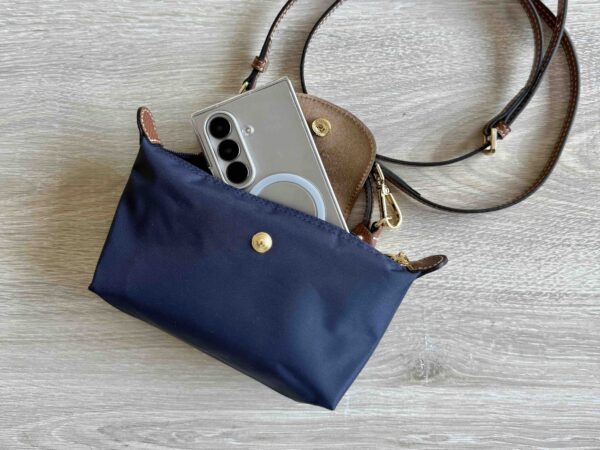
Whether you’re a journalist, content creator, traveller or power user, the Z Fold 7 is fantastic as a laptop replacement. Previously, tablets used to still take up space for the extra screen you’re getting but now, you can carry 8-inches around with you and have it fit in a small handbag.
The Samsung Galaxy Z Fold 7 (512GB) is currently listed for R45 999 on the Samsung SA website.
Disclaimer: Samsung Mobile SA provided the Z Fold 7 for long-term testing and this article reflects that.

Recharged is an independent site that focuses on technology, electric vehicles, and the digital life by Nafisa Akabor. Drawing from her 19-year tech journalism career, expect news, reviews, how-tos, comparisons, and practical uses of tech that are easy to digest. Nafisa is a traveller at heart, having been to 46 countries and counting. Find her edutainment videos covering tech, EVs and travel on TikTok.