Recharged Recharged Recharged
    • HOME
    • ABOUT
    • CONTRIBUTORS
    • PODCAST
    26 May 2026
    • Recharged Recharged Recharged
    • TECH
      • APPS
      • eSIM
      • GADGET
      • MOBILE
      • REVIEWS
      • WEARABLE
    • CARS
      • CARS
      • ELECTRIC
    • LIFESTYLE
      • GAMING
      • INTERNET
      • LIFESTYLE
      • ONLINE
      • SMART HOME
      • TRAVEL
    • ADVICE
      • ADVICE
      • HOW TO
      • TOP 5
      • VERSUS
    • RADIO
    how to

    How to: Use iCloud Custom Email Domain

    Nafisa Akabor, 26/05/2026 4 min read

    I’ve been paying for iCloud+ for years now and one of the features it includes is a Custom Email Domain. This feature does not come with the free iCloud account that gives you 5GB of storage.

    iCloud

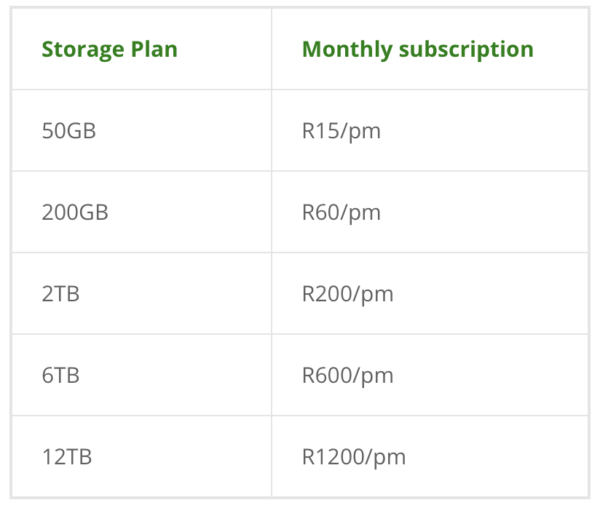
    Instead, it’s on the iCloud+ 50/200GB storage plans and the 2/6/12TB iCloud+ plans. Here are what the prices look like, as of May 2026:
    If you own your own domain, whether it’s for a blog, content creation or as a small business owner, you can leverage iCloud Custom Email Domain with your website to run your email.

    The same way you pay for hosting a website, you also pay for someone to host your custom email address, which may be included in your web hosting. But reliability may be key in which provider you use and how much access to storage you have.

    iCloud+ custom email benefit

    • Up to 5 custom email domains
    • Up to 3 personalised email addresses per domain

    If you are a paying iCloud+ subscriber, you get a bunch of services included in the price you pay. The Custom Email Domain feature includes up to five custom domains, with up to three personalised email addresses.
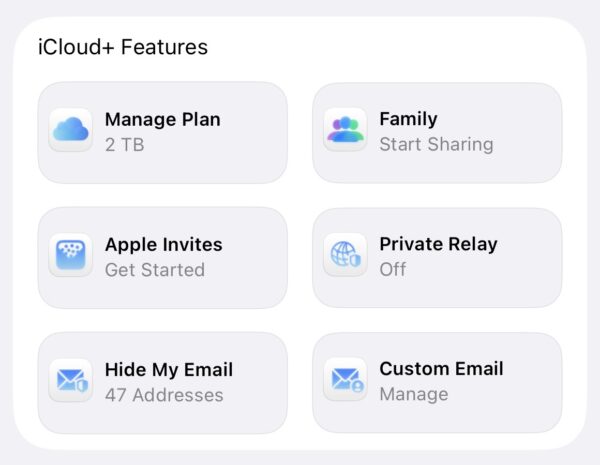
    Like if you have a business email and want to create contact@test.co.za name@test.co.za or admin@test.co.za, you and have to up 3 per domain that iCloud+ will host for you. The ability to add 5 domains is great for anyone who owns multiple domains.

    Why I Cancelled Google Workspace

    I used to be a paid subscriber to Google Workspace for my Recharged.co.za email and when I received a notice to renew my annual subscription, it says the new fees reflect the addition of AI features, I realised I don’t want to be paying for that as I had already switched off AI features on my email. And so I finally cancelled it and switched to iCloud hosting.

    I still have my other Nafisa.co.za email on Google’s legacy G Suite offering from when it was free back in the day. The product launched as G Suite, then got rebranded to Google Apps, and now it called Google Workspace.  If I’m honest, I don’t know how much longer they will let me have it for free. They tried to turn it into paid but there was a lot pushback from existing users and so it currently remains free.

    I am fully aware Apple Business was launched this year as a rival to Google Workspace and I could have used that. I figured I’d just use it from the subscription I was already paying for from one interface. I am open to switching to it later if the need arises.

    Pre-checks before the set-up

    Before you start using iCloud+ for your custom email addresses, there are a couple of conditions that need to be met as an iCloud+ user. Apple gives you a freebie iCloud email, you need to have already set that up, and presumably, you are running it on the Mail app on your iPhone, iPad or MacBook. If not, set up one first.

    The second condition is that you need to have two factor authentication set up for your Apple account. I cannot stress the importance of this. If you would like to read my posts about it already:

    • How to protect your accounts online here
    • Why I use Authy authenticator

    How to set-up an iCloud Custom Email Domain 

    STEP 1: Log into your iCloud account. This can be done on the web or via your iPhone settings
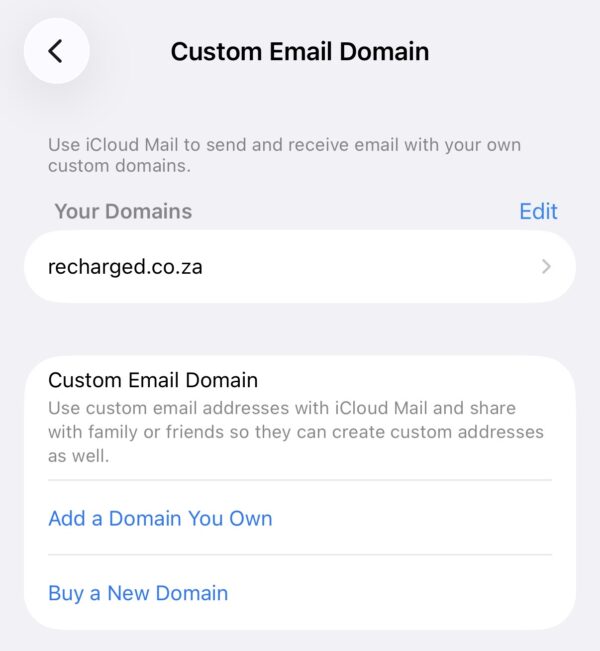
    iPhone interface

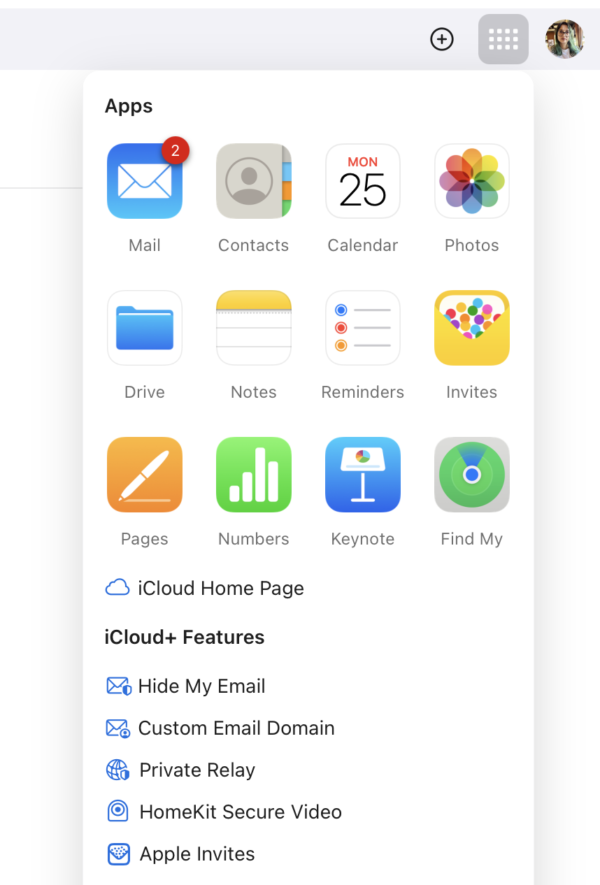
    STEP 2: Click the app icons on the top right next to your profile pic and click on Custom Email Domain
    iCloud web interface

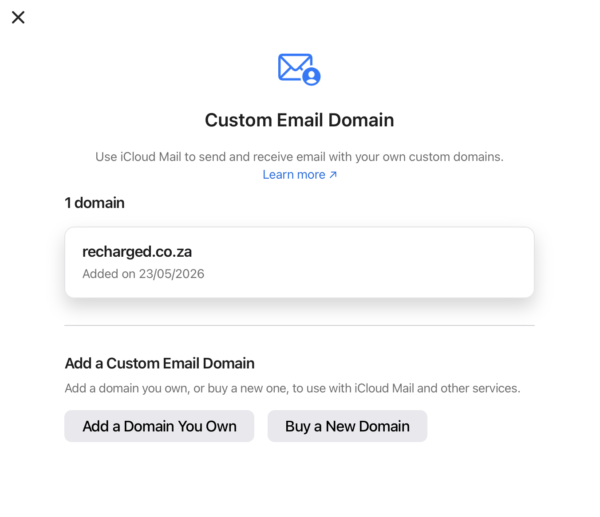
    STEP 3: Click on Add a Domain you own

    STEP 4: Fill out your info and verify you own it with a code sent to you over email
    STEP 5: Update your records with your domain registrar. There are 5 fields of information you need to fill. You do this by logging into your account with your web host provider and go to manage domain or DNS settings. You need to change the MX, TXT, CNAME records so allow Apple to fetch your email. Top Tip: Remove the MX for your previous provider at this step, if you are migrating from another email provider.

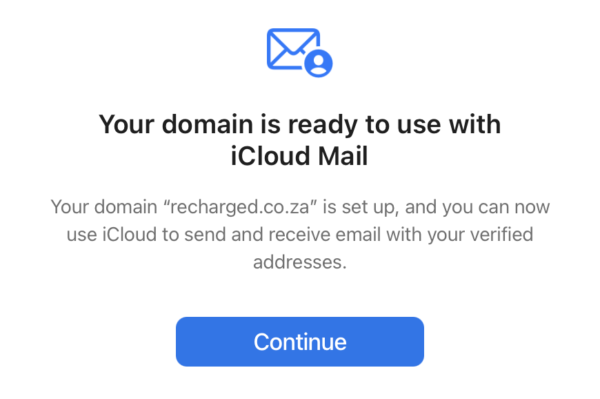
    STEP 6: You will get a confirmation when it is actioned successfully. It looks like this:
    And that’s how easy it is. In all honesty, it should take about 5 minutes to do. Your email will now come through on the Mail app, but provided you have an existing (free) iCloud email.


    Tags #Apple #Custom Email Domain #iCloud
    Previous

    How to: Use iCloud Custom Email Domain

    Next

    Review: Tomodachi Life: Living the Dream

    Nafisa Akabor

    Nafisa Akabor was introduced to technology back in the 80s and by the late 90s, she doubled up as family tech support along with her first encounter with dial-up internet. She's been playing around on these internet streets before Google was born; it's no surprise she ended up becoming a tech journalist in 2007. Nafisa started dabbling with EV articles back in 2017 and hasn't looked back.

    Related posts

    how to

    How to: Start Blogging

    Nafisa Akabor, 28/10/2016 9 min read
    how to

    How to: Driver’s Licence Renewal Waterfall RTMC

    Martha van Zyl, 22/10/2023 3 min read
    how to

    How To: Get paid with PayPal

    Nafisa Akabor, 04/03/2021 4 min read
    how to, internet

    Cloud backup solutions – your data, your choice

    Nafisa Akabor, 28/11/2023 6 min read
    how to

    How to: Turn on Whatsapp 2-step verification

    Nafisa Akabor, 05/01/2024 2 min read
    how to, apps

    How to: Run two Whatsapps on one phone

    Nafisa Akabor, 26/06/2023 2 min read

    ABOUT

    Recharged is an independent site that focuses on technology, electric vehicles, and the digital life by Nafisa Akabor. Drawing from her 18-year tech journalism career, expect news, reviews, how-tos, comparisons, and practical uses of tech that are easy to digest. Nafisa is a traveller at heart, having been to 46 countries and counting. Find her unique travel tips and tricks on TikTok alongside tech & EV content.

    BIMONTHLY NEWSLETTER

    FOLLOW ON WHATSAPP

    RADIO SLOT ON SAFM

    AIRALO eSIM DISCOUNT CODES

    SECTIONS

    EVs

    • electric
    Zero Carbon Charge Adds Two N3 Sites
    Nafisa Akabor, 21/05/2026
    Zero Carbon Charge opened two new solar off-grid EV chargers, strategically positioned along the N3 corridor between Johannesburg and Durban...
    Living Electric: BYD Dolphin Surf
    Nafisa Akabor, 16/05/2026
    The BYD Dolphin Surf appeals because of its small size as a runaround city electric car. It was the cheapest...
    Pure Electric scooters launch in South Africa
    Nafisa Akabor, 07/05/2026
    Pure Electric scooters is now officially available in South Africa, starting at R8 999. It is positioned as expanding access to...
    Living Electric: Geely E5 EM-i
    Nafisa Akabor, 30/04/2026
    I recently spent a week driving the Geely E5 EM-i Apex, plug-in hybrid as part of my new Living Electric...
    Living Electric: Lexus RZ 500e SE
    Nafisa Akabor, 20/04/2026
    Lexus launched its first electric car in South Africa in February, at a media event in Cape Town, which Recharged...
    BYD Atto 8 PHEV 7 seater launched
    Recharged, 16/04/2026
    BYD has introduced its new seven-seater Atto 8 SUV plug-in hybrid at a media event in Johannesburg on 15 April....
    Geely E2 new cheapest EV in SA
    Nafisa Akabor, 14/04/2026
    Geely South Africa unveiled its new compact all-electric hatchback that is currently the cheapest electric vehicle in South Africa. The...
    BYD Dolphin Surf: 6 months in
    Recharged, 14/04/2026
    BYD South Africa recently shared its sales figures to Naamsa, the Automotive Business Council for the first time since it...

    Reviews

    • reviews
    7.0
    Review: Tomodachi Life: Living the Dream
    MJ Khan, 25/05/2026
    Tomodachi Life was Nintendo’s strangest success stories on the Nintendo 3DS. Released in 2013 as the follow-up to the Japan-exclusive...
    7.7
    Review: Honor Magic 8 Pro
    Nafisa Akabor, 19/05/2026
    The Honor Magic 8 Pro came to South Africa in March 2026 at a price of R27 999. It is...
    9.5
    Review: Super Mario Bros. Wonder + Meetup in Bellabel Park
    MJ Khan, 04/05/2026
    When I reviewed Super Mario Bros. Wonder over two years ago, I shared that it stands as “a testament to...
    9.2
    Review: Pokémon Pokopia
    MJ Khan, 10/04/2026
    I’ll start with a small admission. I don’t usually review games I haven’t finished. It’s part of the discipline. Play...
    8.7
    Review: MacBook Neo
    Nafisa Akabor, 26/03/2026
    The MacBook Neo is one of Apple’s most talked about releases in years. It’s being touted as a student laptop...
    9.2
    Review: Oppo Reno15 Pro
    Martha van Zyl, 05/03/2026
    I’ll say it upfront: I’m lazy. Comfortably, stubbornly lazy. Which is why I’ve been using an iPhone for years. It...
    8.3
    Review: Mario Tennis Fever
    MJ Khan, 04/03/2026
    Mario Sports games are often a mixed bag; not enough simulation and realism for some, too gimmicky and shallow for...
    7.5
    Review: Xiaomi Robot Vacuum Cleaner 5 Pro
    Nafisa Akabor, 13/02/2026
    Automating the most mundane household chores is always a win for me. It’s why robot vacuums have become the hardest-working...

    ADVICE

    • advice
    How to: Disable Gemini on Gmail
    Nafisa Akabor, 29/01/2026
    Google has been rolling out Gemini on Gmail to integrate more AI features to help with productivity. There’s a good...
    Samsung Z Fold 7 vs Honor Magic V5
    Martha van Zyl, 27/01/2026
    Foldables are no longer niche tech curiosities; they’re serious productivity machines and lifestyle statements. Samsung’s latest Galaxy Z Fold 7...
    Top 5: Earbuds with Live Translate
    Martha van Zyl, 13/01/2026
    Imagine walking through a busy market in Tokyo or Buenos Aires and having real-time translation play right in your ears....
    How to avoid Black Friday scams
    Nafisa Akabor, 17/11/2025
    Remember how back in the day, we used to see fake Takealot ads on Facebook? And people fall for it...
    How to blacklist a stolen phone
    Nafisa Akabor, 26/08/2025
    Living in South Africa means there’s a higher than average chance our phones may get stolen. I had mine stolen...
    DHgate Review from South Africa
    Nafisa Akabor, 15/05/2025
    After being flooded with TikToks about DHgate, I knew I had to test it. Since the US tariff war intensified...
    DJI Neo vs DJI Flip
    Yenziwe Ngwenya, 14/05/2025
    Drones are slowly becoming a must-have for content creators. Whether you’re a filmmaker or just getting started with vlogging, everyone...
    A holiday travel tech list
    Nafisa Akabor, 07/04/2025
    Whether you’re going away for the upcoming Easter break, holidays are all about relaxing and disconnecting. A little bit of...
     © 2023-2026 Recharged
    • Login
    • Register

    Forgot Password

    Registration is closed.