
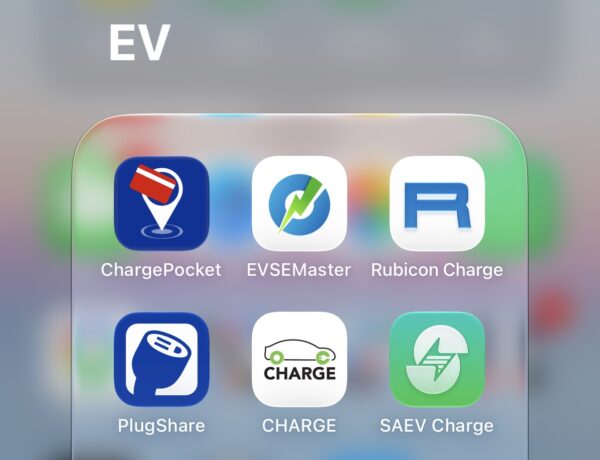
As mentioned in my previous post, I will be sharing what apps I’ve downloaded so far, which is now sitting in a folder on my home screen so its easily accessible.
Here are all the EV apps I downloaded onto my phone or services I signed up for, to make my EV journey more seamless.
In no particular order:
CHARGEPOCKET
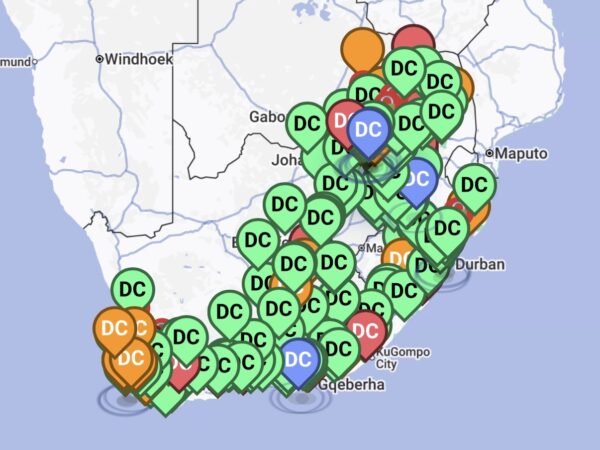
The ChargePocket app is owned by GridCars and shows you a live map of charging stations within their network in South Africa. This includes everything GridCars rolled out, and Rubicon’s chargers (but not Zero Carbon Charge). It’s a fantastic live map because at first glance you can easily see, through colour coding, what’s available (green), charging in progress (blue), under maintenance (orange) or cannot charge (red). Some have a locked symbol to indicate restricted access like at a country club. It also tells you how many chargers at a location and if they are AC or DC and location specific info.
Other useful features of the app is the ability to start your charge remotely, after loading your RFID card to your profile so you don’t have to physically carry your card with you; check your charging history, and go into the app settings, which supports topping up your account. You can also easily see how much credit or tokens you have left. I keep my account topped up.
RUBICON
The Rubicon app also supports a live map, but not as populated as ChargePocket (and no Zero Carbon Charge link) and you can see how many chargers are available for each location. You can also go into your wallet and check your balance or top-up, check transactions, start a charge session remotely, and there’s a reserve section that says ‘coming soon’. You can also access your profile. leave feedback and contact support, etc. The first time I topped up my account, I couldn’t access the app so I feel like the money was wasted but I eventually got into my account. I keep my account loaded with some credit.
PLUGSHARE
The PlugShare app is more of a social app, it works globally but location based. As with the other two, the landing page shows a map of chargers in South Africa. Unlike ChargePocket and Rubicon, Zero Carbon Charge locations are visible on PlugShare. You can also easily see what filters the search supports, like for what’s available, 2+ stations, fast charging, lodging, dining, free, etc.
Under the “me” section, there is a quick look at your profile and if used the social aspect, it will show you a summary. Like how many pics you’ve added, check-ins, thumbs up received, or locations added. The main drawcard for this app is checking the activity feed so you can see what’s people in the EV community are up to. It has useful info like reviews, costs, if units are broken, and pictures which help you find the location.
CHARGE
Owned by Zero Carbon Charge, you can only access their network. At the moment, it shows the three locations that are live in South Africa, which are ones I’ve been to in Wolmaransstad on the N12 after Klerksdorp, and the two that launched along the N3 between Johannesburg and Durban this year. It’s a bit bare bones since it’s locations a bit far out but it lets you start a charge and access your account, which supports invoices, wallet, sessions, support, feedback etc.
SAEV CHARGE
New player to the scene, SAEV mainly operates in the Western Cape, but recently launched a site in Gauteng. It’s in Pretoria at The Grove Mall, which is visible on their map. I like that their rates are cheaper at R5.88/kWh at their sites and I’m hoping they roll out more around Gauteng. It’s a great app from a UX standpoint, plus lets you access charging options, insights and your profile. They support Apple Pay as a payment method, which I absolutely love. This one isn’t absolutely necessary to get unless you live in Pretoria and want to see its status before visiting. This will change as they roll out more EV chargers in Gauteng.
EVSE MASTER
Okay, this one makes the cut because it’s the app for my home wallbox charger that I had installed back in 2022, which I got from EV Charge. The main reason I chose this 1 phase power wallbox charger was because it had an app; the 3 phase power wallbox did not support an app. Anyway, I also recently bought some EV accessories from EV Charge as well as part of my Ora 5 Diaries.
I will update this post as I add more apps. There were a couple of others I downloaded but they are useless.
Ora 5 Diaries: My EV apps folder


Recharged is an independent site that focuses on technology, electric vehicles, and the digital life by Nafisa Akabor. Drawing from her 19-year tech journalism career, expect news, reviews, how-tos, comparisons, and practical uses of tech that are easy to digest. Nafisa is a traveller at heart, having been to 46 countries and counting. Find her edutainment videos covering tech, EVs and travel on TikTok.