

Apple’s first foldable launched in South Africa on 23 October, the same day as the US and other first wave countries. It was opened for pre-orders the week before.
At the iStore media event that morning, the Core Group confirmed with Recharged that their stock allocation at iStore was sold out by the morning. This was from pre-orders and whatever stock was available in store.
I’ve had an opportunity to spend two weeks with the iPhone Duo for testing. I received it a couple of days before flying to Seoul, South Korea on a business trip with LG SA. Here’s my experience with the Duo.
IPHONE DUO QUICK LOOK
- A20 Pro chip
- 6” outer display; 5.4” cover display
- Touch ID or Apple Watch unlocking
- 48MP Dual Fusion Cameras
- eSIM only
- Siri AI, next-gen Apple Intelligence
- Apple Pencil support coming
DESIGN
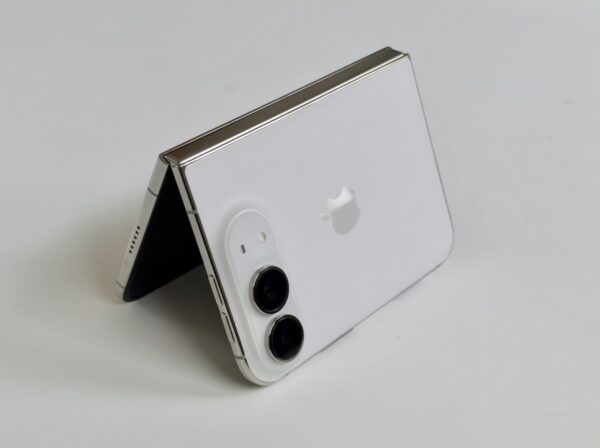
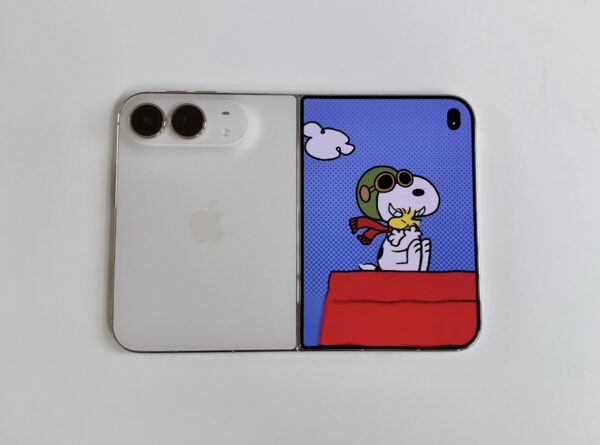
The iPhone Duo features a wide, passport-shaped design that is D shaped. By D shaped, it means the right hand side edges are curved like a D. So, not a typical shape of a device we’ve seen before.
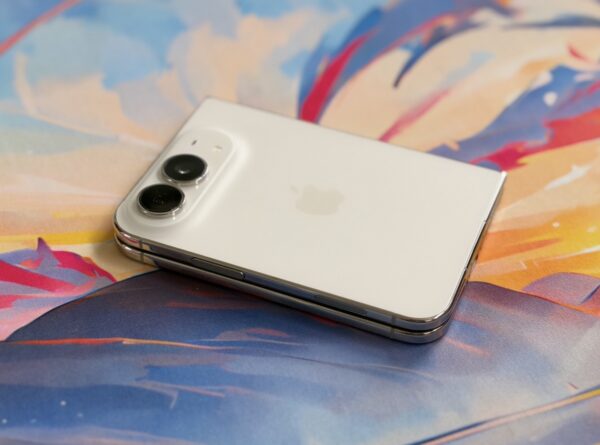
It features a large horizontal camera bump on the back, separate volume up and down keys on top and a power/touch ID and camera button on the side. More on that in a bit.
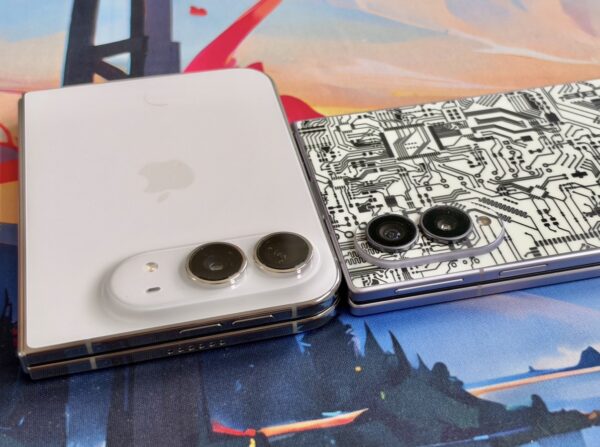
It is 117.8mm in height, 164.6mm in width and 5.2mm in depth. It fits in the hand comfortably, but it weighs 254g. In comparison to the most obvious rival, the Samsung Z Fold 8 at 201g, it’s about 21% heavier.
The iPhone Duo is made with titanium, which feels solid in the hand, whereas the Fold 8 is made from aluminium thus lighter, which makes it comfortable to hold for longer periods.
It is also rated IP68 making it splash, water and dust resistant, with a maximum depth in water up to 6m for 30 minutes.
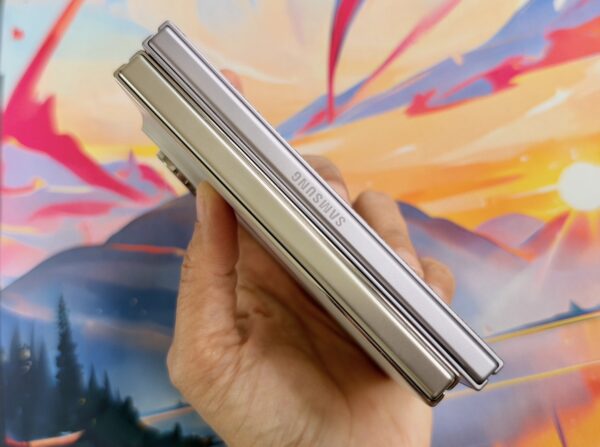
Having used the Fold 8 since launch, I’ve gotten used to how lightweight it is and easier to grip, as it has a more boxy design when compared to that D-shaped edge of the Duo.
One of the frustrations I had with the Duo is the design choice of the placement of the buttons. Samsung keeps its power and single volume key together, while Apple places them on the top and side.
Depending on how I held the phone when open, I kept accidentally pressing the lock and Touch ID button instead of adjusting the volume. It may seem minor, but it occurred repeatedly, which become a bit frustrating because of how I would orient the phone, with the bulky dual-camera module at the top or bottom, depending on how I felt.
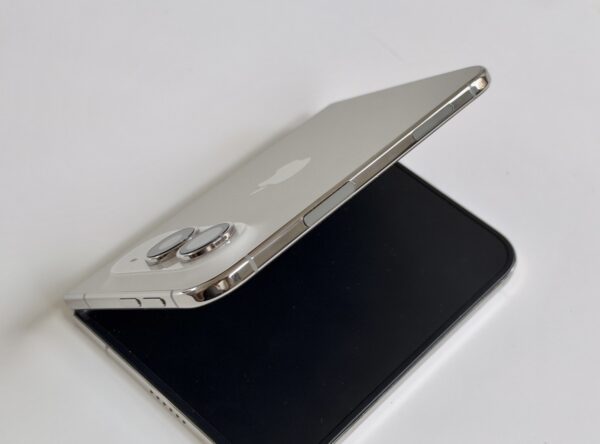
Interestingly, Apple brought back Touch ID on the iPhone Duo, which feels cumbersome compared to the seamlessness of Face ID that I’ve gotten used to over the years. The Duo’s design reportedly couldn’t support the True Depth camera for Face ID.
That is where the Duo felt awkward. I enjoyed what I could do with the larger screen, but I didn’t always enjoy the hardware surrounding it.
I was not supplied with a phone case with my review unit, so I carried in a small cloth bag to protect it but I was also a bit nervous about damaging an expensive device.
Another thing to note on the design, it is an eSIM only unit, you would need to switch to eSIM if it’s your primary device. I switched on Vodacom a few years ago to eSIM but had to change back to physical when I changed phones as the transfer failed. So this may be cumbersome.
DISPLAY
The cover display on the Duo is 5.4-inches, while the inner display is 7.6-inches. Both have what Apple calls a Super Retina XDR display that is OLED with a 120Hz refresh rate.
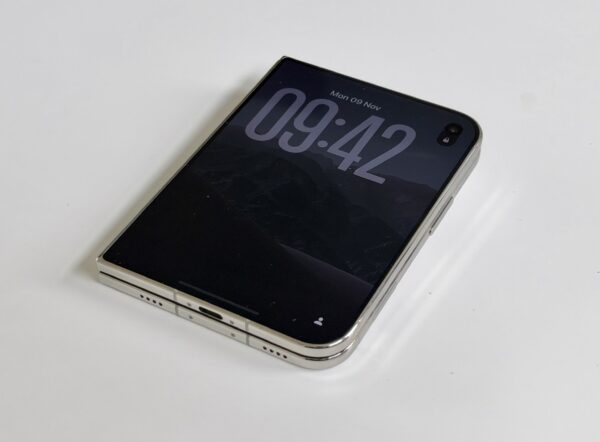
Both displays have anti-reflective coating, support the Apple Pencil and has up to 3000 nits of peak brightness.
The cover display is 1878×2670 pixels at 430ppi, and the inner display is 1398×2034 pixels at 460ppi. The inner has a nano texture finish, and I think it’s one of the Duo’s strongest features as it minimises glare and reduces fingerprints.
The matte finish is a welcome change from the glossy screens on other foldables, and it helps make the crease less noticeable. The fold is still there, but you don’t actually see it while viewing content. I predict that matte displays may be the trend on foldables next year.
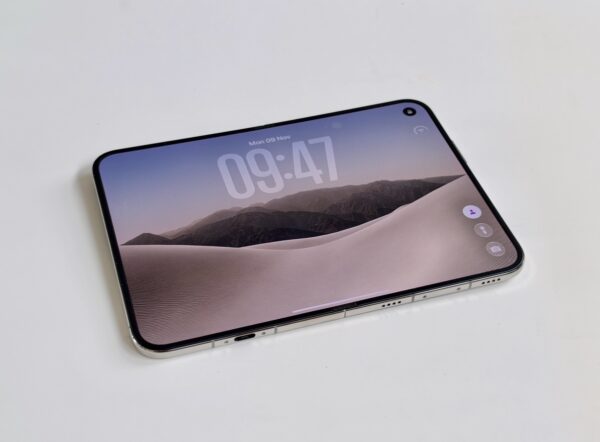
However, there is an important concern around the screen. Headlines following the launch have been dominated by reports of inner display failures. Apple has acknowledged the issue, saying it affects a “small number” of phones that affected customers will have their units replaced under its Apple Care warranty. That said, our review unit did not experience a screen failure.
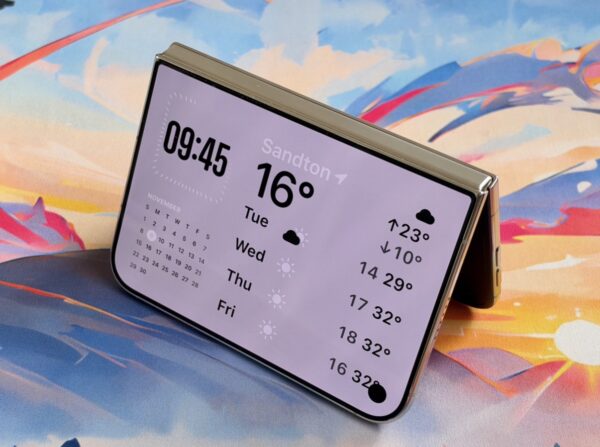
The 5.4-inch cover display has short, wide proportions, which felt restrictive once the keyboard appeared, leaving less space for content above it. The keyboard felt disproportionately large compared the Fold 8.
For quick interactions, I could use the cover display, but when replying to emails or doing more typing, I preferred opening the phone. The inner screen felt like the better place to get things done rather than simply an optional larger view.
APPS AND MULTITASKING
The iPhone Duo runs on iOS27. I set up the Duo ahead of a business trip abroad, which gave me an opportunity to use it for both work and leisure.
Setup was simple, using it as a brand new device. But because I signed in with my Apple ID to sync passwords and download apps as needed, it also pulled all my Photos from my iCloud library so that was the only thing that fully carried over.
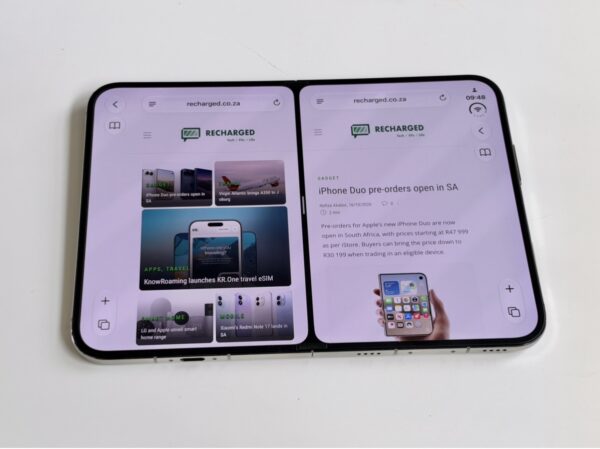
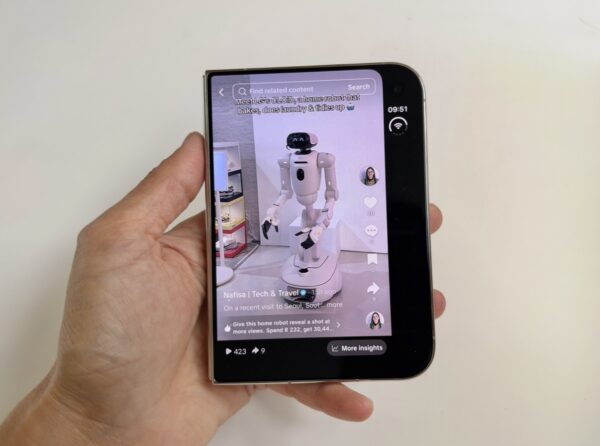
I liked that Apple made clever use of the space that makes up the D edge, with info appearing on the sides instead of the bottom, like the app dock and info for battery, WiFi etc.
But once I began using it regularly, the experience didn’t feel as smooth as using an iPhone Pro, and this is not Apple’s fault – it’s the lack of support by app developers.
The one thing I noticed when charging, you couldn’t see from the home screen how long it takes to charge, like you can on regular iPhones. You have to go deeper into the settings to see how long it takes to get to 80% for example.
Apple-owned apps aside, it needs more support. Most of the apps and services I use were not optimised for it. It had thick black borders around it, which made the view on the cover display feel narrower. According to Instagram boss Adam Mosseri, it’s tricky to work with a display like the Duo. So maybe it will take time before apps are supported properly.
I also struggled to return to the previous screen at times. In some apps, it wasn’t clear how to go back so when I couldn’t figure it out, I resorted to closing the app and reopening it. This is not the seamless experience I expect as an iPhone user.
My issue isn’t that the Duo needed some adjustment, as a different format naturally involves a learning curve. It was that it didn’t always feel intuitive once I moved beyond setup into everyday use.
That said, the multi-tasking aspect was intuitive, it’s just drag and drop. Move an app to whichever side of the screen you want it to be on, and open another app next to it.
I like that you can open two of the same apps, like having two browser tabs opened side by side. The Duo does not offer an additional floating windows like the Fold 8. If you’re familiar with Samsung’s approach, Apple’s multitasking can feel restricted.
On my trip abroad, I used my live transcribing app for the conferences I attended, and used it alongside my email or notes app and wished I had an option of additional floating windows. The Fold 8 allows up to 8 floating apps minimised.
I enjoyed viewing content on the inner display while holding the device vertically. It was easier to read, watch, browse and scroll. It’s also handy to load your Kindle app or other apps where you can read magazines.
I think the Duo’s multitasking foundation is promising, the software will improve over time, but the focus needs to be on app support.
CAMERAS
- 48MP Main: ƒ/1.6 aperture
- 48MP Ultra-Wide: /2.2 aperture
- 120° field of view (ultra wide)
- 2x optical-quality zoom
- Smart Take, Kid Cue
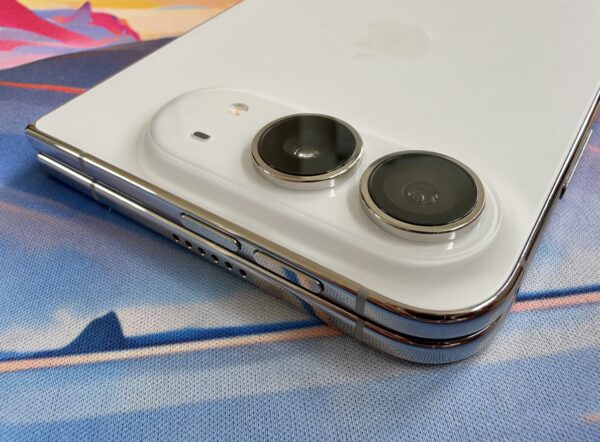
The dual 48MP rear Fusion cameras generally delivered good images. For most regular shots, I was happy with the results.

There is no dedicated telephoto lens though, so Apple’s “optical-quality” zoom relies on cropping. I’ve said this for years now that nobody actually buys a foldable phone for the cameras, it’s more for the folding screen.

I found on certain shots taken close to sunset with the sun behind could appear overexposed, while macro mode was inconsistent. I preferred results where the camera was close to the subject before switching to macro as the quality was better.

The feature I found useful while travelling alone was Smart Take, the automated hands-free photography option introduced on the Duo. It meant I could take pics of myself without asking strangers.

There’s also a cute Kid Cue mode to get your kids attention before taking a pic.
So to sum up, regular photographs were generally good, and Smart Take proved useful, but macro results were uneven and there is no dedicated telephoto lens. I also found that after lengthy use of the camera, the phone heats up.
BATTERY LIFE
Apple says battery life on the iPhone Duo is “up to 24 hours” with typical use. And lists video playback as 44 hours on the outer display and 31 hours on the inner. But it was one area where I had no complaints. The Duo lasted well during my testing.
It was large enough to last a couple of days while traveling, which is why I found charging to take long. It felt slow, like when I wanted to top up during the day and get back to using the phone.
Night charging works best so you don’t notice without fast charging. Though, Apple says charge up to 50% in around 20 minutes with a 60W capable charging plug.
FINAL THOUGHTS
Apple’s first attempt at a foldable is a step in the right direction. The matte inner display, barely noticeable crease and battery life were the highlights for me. It’s fantastic as a travel companion, too without carrying a laptop or tablet. I enjoyed using the Duo when opened, but I didn’t always enjoy the hardware and software experience around it.
Having used the Z Fold8 since launch also set the bar for me in terms of weight, grip and multitasking. I prefer its boxier design, and the apps I used felt better suited to its display proportions. I’ve also gotten used to having floating windows alongside split-screen apps, which made the Duo’s multitasking feel more limited.
For a future generation, I’d like Apple to focus on making the Duo lighter and more comfortable to use. That means better button placement, a less restrictive typing experience on the cover display and more intuitive app navigation.
The cameras are decent, but they aren’t the main reason I’d choose a foldable. Getting those everyday interactions right matters more to me. App support may take time, but the basics need to feel intuitive from the start.
There’s also the risk that comes with buying a first-generation device, especially with the reported display failures. Our review unit hasn’t experienced that issue, but it remains a concern alongside the frustrations I encountered during everyday use.
At R48 000 in South Africa for the base 256GB model, the Duo is clearly aimed at early adopters willing to live with those compromises. There’s plenty here to like, particularly when it’s open, but for everyone else, I’d recommend waiting for a more refined generation.
6.8 Score
Pros
- Fantastic matte 'nano texture' inner display
- Great battery life
- Barely noticeable crease
Cons
- Lack of third party app optimisation
- Overheats with extensive camera usage
- Button placements don't feel ergonomic
- Very expensive in South Africa
Final Verdict
The iPhone Duo’s matte inner display, barely noticeable crease and strong battery life were the highlights of my two weeks with it. But its weight, awkward button placement and inconsistent app experience made everyday use less intuitive than I’d hoped. At R48 000, it's a first-gen device aimed at early adopters; for everyone else, I’d recommend waiting for a more refined version.


Recharged is an independent site that focuses on technology, electric vehicles, and the digital life by Nafisa Akabor. Drawing from her 19-year tech journalism career, expect news, reviews, how-tos, comparisons, and practical uses of tech that are easy to digest. Nafisa is a traveller at heart, having been to 46 countries and counting. Find her edutainment videos covering tech, EVs and travel on TikTok.