
Ever since I updated my Apple Watch Series 10 to watchOS 26.4, I noticed that it struggled to read my heart rate during workouts. I assume this may be happening to others hence my post with a fix.
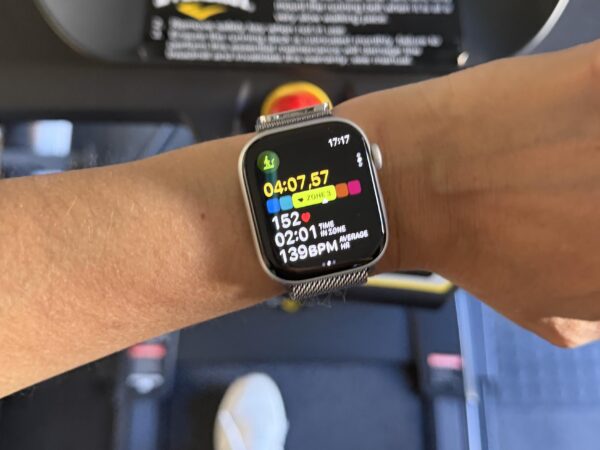
It became increasingly frustrating as it took between five to eight minutes to give me a reading while running on a treadmill, compared to about a minute or two maximum previously.
The reason this mattered to me is that I link my Apple Watch to my medical aid app and earn points for working out. I didn’t want it to affect my workouts so I eventually decided to give it the last resort update for my iPhone – a force restart.
watchOS 26.4 bug: How to force restart an Apple Watch
A force restart or I call it a hard restart is different to switching your device off and back on again. On the Apple Watch, you press and hold the Digital Crown and side button together until you see the Apple logo appear on your screen.
I don’t know why I didn’t do it sooner, but it appears to have fixed it, along with just wiping down the back of my watch, which I do frequently as I work out multiple times a week, and for the purpose of testing, I switched hands.
So after my force restart, I wore it on the right hand and it worked as my reading came up after less than 1 minute and 50 seconds.
I hope this bug does not return but if you are having this issue, I suggest you try the same.


Recharged is an independent site that focuses on technology, electric vehicles, and the digital life by Nafisa Akabor. Drawing from her 19-year tech journalism career, expect news, reviews, how-tos, comparisons, and practical uses of tech that are easy to digest. Nafisa is a traveller at heart, having been to 46 countries and counting. Find her edutainment videos covering tech, EVs and travel on TikTok.