

I’ve been using the Mini App for years but it underwent a major revamp in 2024. Now that I’ve experienced the Mini Cooper SE for six months, I could see how useful the updates made it.

An electric car is all about the software; it’s a more “connected” car vs. my regular petrol Mini. This is why the Mini app was invaluable to my experience with the Cooper SE.
The app supports adding more than one vehicle to it, fortunately. So, in addition to my car, I could load the Cooper SE. You do this by adding the VIN number.
It was seamless and I didn’t need dealership intervention like some other EVs. Once the car was paired to the app, I logged into the vehicle with those credentials.
The car will ask you to scan a QR Code and link your profile. I’ve tested many car apps over the years, and the BMW/Mini ones are superb, more so because they are big on privacy. Once I log out of my profile, it’s like I never used the vehicle, and nobody can access my data or see the addresses I’ve punched in, etc.
Navigating the Mini app
The app is quintessential Mini, so it lets you customise it to your liking by choosing from the various themes or from solid and dual colour schemes. Some of the themes include John Cooper Works, Pride, Earth Love, Heritage, Union Jack and Iconic.
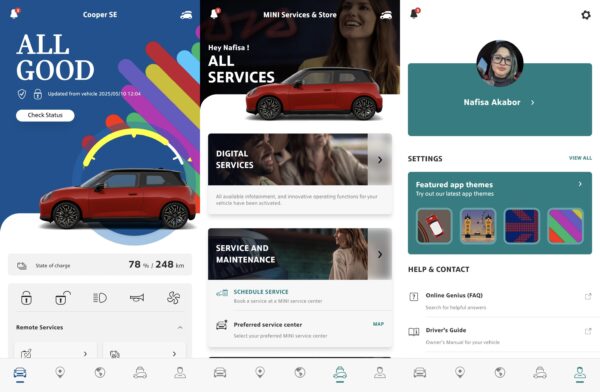
The main menu settings are the bottom of the screen, such as car, location, explore Mini, Mini Services & Store and Profile settings. Additional app settings include things like PIN. deleting your data, permissions, units and notifications.
The app has a neat layout and a landing page with all the essentials at a quick glance, like state of charge, which includes percentage and kilometres remaining, and a quick status indictor that all is good. If your tyre pressure or anything else needs attention, you will immediately see it on the top when you login.
The homepage also has basic controls for vehicle, like lock, unlock, lights, horn, and climate control that you can easily toggle.
Beneath that are the remote control features you get. I can control things like mirrors, windows, view the 360-degree camera and control battery pre-conditioning.
The location tab shows the current location of the vehicle, charging stations, parking etc. You can also save destinations as favourites and you can choose if you want to car to learn from your navigation patterns. Much like most GPS services, you can choose to avoid highways, tolls etc for the in-car navigation, and other charging settings that I will touch on further below.
Remote Camera
The remote camera is nifty if you are charging somewhere and just want to check the surroundings of the car. It will “wake” the car up, and switch the lights on, which may be spooky to people nearby if they don’t know what’s happening.

The remote 3D view will take multiple pictures of your vehicle, which you can view directly via the app in 360-degrees, after the images are stitched together.
I tried it while charging the Cooper SE at an event and from the inside venue, did a quick check-up instead of walking back outside. As you can tell from the screenshot, the people around were a bit confused.
My Trips
The My Trips tab shows you stats about your drive. It gives you a summary per month, efficiency stats, trip history, all trips by month, and then a recap or review of each previous month.

Under each month, you can see total duration that you drove with an average per day; km per day and in total; average speed, and there’s a map view of all the trips using the destinations.
The one downside here is that it only goes back to the previous month, and not months before. So I cannot access November, December, January, February and March unfortunately.
Charging Data
The most used feature on the Mini app for me was access to the Charging data. I used the app to monitor all my charges when I wasn’t at home. Inside the specialised tab, you can see your charging plan, which you can set to whatever percentage you want (i.e. 80% or 100%), and adjust for climate or preconditioning, find stations, and then access your charging statistics.
You can see your full charge history, view them by month, with summaries, duration, locations, etc. It’s very detailed and no data is left out. You can also export the data to XLSX format.
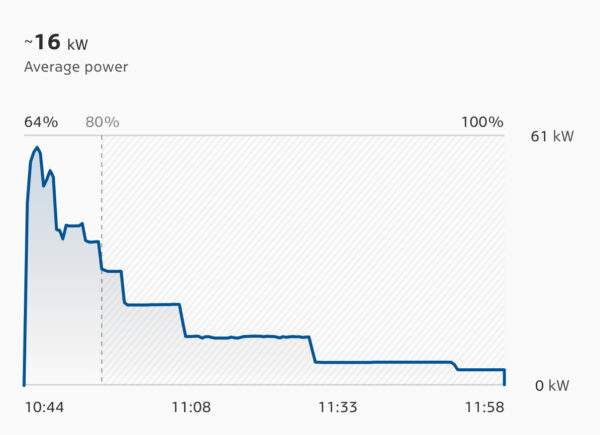
One of my favourite features here is the DC Charging curve. You can see how quick it takes to get between 10-80% and then remaining 20% tapering down to take really long, which is also unnecessary and makes sense to charge to 80% if you are in a hurry. It’s much quicker than the 80-100% charge time.
Other settings you can set include charge limit for AC charging, if the cable should be unlocked after charging, DC fan noise emissions, unlock the charging flap, add energy tariffs, etc.
Mini Services & Store
Under this tab, you can see all relevant info for your vehicle. Like what it supports, what you have access to digitally, including anything you want to upgrade, as well as service and maintenance.
The Digital Services section shows you what packages you have available for your model, and for how long. In my instance, I can see I have the Connected Package, Mini Online, and Driving Assistant Plus.

For a service, you can choose your dealership of choice. However, my experience with the app on my own car confirms that it’s easier to book a service telephonically than wait for someone to get back to you via the app booking.
Overall thoughts
The Mini app is invaluable to any Mini electric driver, purely because of the level of detail available to you. It covers all the bases, even the ones you wouldn’t normally think of. Its brings an additional peace of mind that lets you check up and control certain things remotely and most importantly provides you with trip and charging stats.
This will help you for various things like calculate cost to run it, submit claims, act as a log book, and just overall monitor its status. All the times I was notified about the low tyre pressure what though the app first vs. in the car.
The Mini app has raises the bar for EV owners and once you experience it, it’s difficult getting access to this level of data on other vehicles, more so for me as an EV journalist who regularly tests vehicles.


Recharged is an independent site that focuses on technology, electric vehicles, and the digital life by Nafisa Akabor. Drawing from her 18-year tech journalism career, expect news, reviews, how-tos, comparisons, and practical uses of tech that are easy to digest. Nafisa is a traveller at heart, having been to 46 countries and counting. Find her unique travel tips and tricks on TikTok alongside tech & EV content.