

Choosing the right computer processor isn’t about buying the fastest or most expensive chip.
Intel Core and AMD Ryzen are excellent all-rounders, Apple Silicon combines performance with energy efficiency, Snapdragon makes mobile productivity appealing, and Nvidia excels at graphics-intensive tasks.
The best processor depends on what you actually do with your device.
UNDERSTANDING DIFFERENT COMPUTER PROCESSORS
Shopping for a new computer can feel like studying for an IT exam you never signed up for. Between processor generations, core counts, clock speeds, and increasingly complicated naming conventions, it’s easy to lose sight of what you need.
And with artificial intelligence becoming a bigger selling point, there’s another layer of technical jargon to navigate.
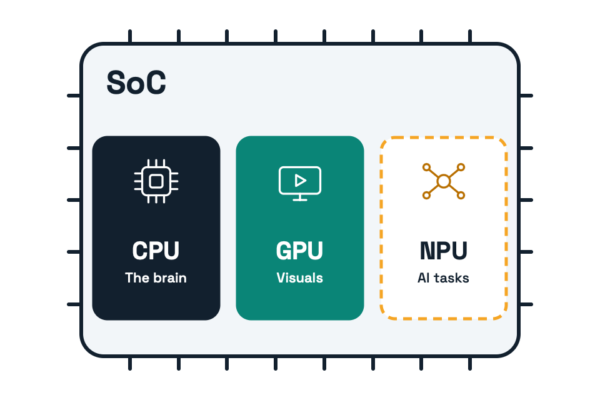
Let’s start with four important terms:
- CPU (central processing unit): The brain of your computer, responsible for executing instructions, running applications, and managing everyday tasks.
- GPU (graphics processing unit): Handles graphics rendering, gaming visuals, video editing, and certain computationally intensive tasks.
- NPU (neural processing unit): A specialised processor designed to accelerate compatible artificial intelligence tasks efficiently.
- SoC (system on a chip): Combines several components, including the CPU, GPU, and potentially an NPU, into a single integrated chip.
There’s also some overlap between processor brands and product families. Celeron belongs to Intel, Ryzen belongs to AMD, Snapdragon is developed by Qualcomm, and Apple Silicon encompasses Apple’s own processor families. Understanding these differences can save you both money and frustration when purchasing your next device.
INTEL CELERON: COMPUTING ON A BUDGET
BEST FOR: Basic schoolwork, emails, light browsing, and simple administration.
Intel Celeron processors were developed for affordable, entry-level computers. They’re commonly found in older budget laptops, Chromebooks, and basic desktop computers.
Intel has largely moved away from Celeron branding in newer consumer devices, with its Intel Processor N-series serving a similar entry-level market. These processors can be perfectly adequate if your digital life revolves around checking emails, typing documents, and occasionally watching YouTube.
However, opening a dozen browser tabs while attending a video meeting and working on a spreadsheet might quickly expose their limitations.
For South African parents purchasing a child’s first computer, an inexpensive Celeron laptop might seem attractive. However, a newer entry-level processor or a reputable refurbished Intel Core or AMD Ryzen laptop could offer better long-term value.
THE VERDICT: Suitable for very basic computing, but not the ideal choice for demanding multitasking or future-proofing.
INTEL CORE AND CORE ULTRA: THE EVERYDAY ALL-ROUNDERS
BEST FOR: Office workers, students, business professionals, home users, and general multitasking.
Intel remains one of the most recognisable names in personal computing, and its mainstream Core processors are a sensible starting point for most Windows users.
Alongside the familiar Core i3, i5, i7, and i9 naming conventions, shoppers will encounter newer Core 3, Core 5, Core 7, and Core Ultra processors.
| Processor | Typical applications |
| Intel Core i3 / Core 3 | Basic productivity and everyday computing |
| Intel Core i5 / Core 5 | Business, studying, and multitasking |
| Intel Core Ultra 5 | Modern productivity and compatible AI applications |
| Intel Core i7 / Core 7 | Advanced multitasking, gaming, and creativity |
| Intel Core Ultra 7 | Demanding productivity and creative applications |
| Intel Core i9 / Core Ultra 9 | Professional and enthusiast workloads |
Intel Core Ultra processors generally place greater emphasis on energy efficiency, graphics capabilities, and dedicated AI acceleration, although specifications vary between models.
One of Intel’s biggest practical advantages is its established software ecosystem. From Microsoft Office and accounting packages to printers and specialised business applications, conventional Intel-powered Windows computers offer broad compatibility.
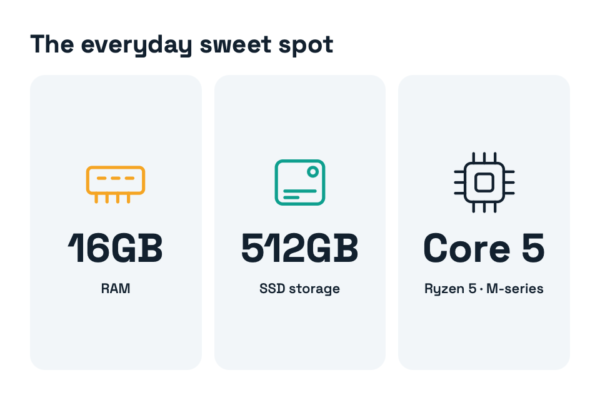
For average South African households or small businesses, a recent Intel Core 5 or Core i5 laptop with 16GB of RAM and SSD storage is a sensible investment.
THE VERDICT: A versatile, dependable option for people who simply want their computer to get things done.
AMD RYZEN: THE VERSATILE PERFORMANCE CONTENDER
BEST FOR: Multitasking, gaming, content creation, and value-conscious buyers.
AMD Ryzen processors compete directly with Intel Core and have become popular among gamers, creative professionals, and everyday users.
The Ryzen range follows a broadly similar structure to Intel’s:
| Processor | Typical applications |
| Ryzen 3 | Entry-level everyday computing |
| Ryzen 5 | Productivity, multitasking, and general computing |
| Ryzen 7 | Gaming and demanding creative applications |
| Ryzen 9 | High-performance professional computing |
| Ryzen AI | Computing with dedicated AI acceleration |
| Ryzen X3D | Performance-focused desktop gaming |
Many Ryzen processors incorporate AMD Radeon graphics. Depending on the specific chip, these integrated graphics can handle casual gaming, photo editing, and light video production without requiring a dedicated graphics card.
Ryzen processors frequently offer competitive performance relative to their price, making them particularly appealing to South Africans looking to stretch their technology budgets.
However, don’t automatically assume that every Ryzen 7 is faster than every Ryzen 5. Processor generation, architecture, cooling, and power limits all influence performance.
THE VERDICT: An excellent alternative to Intel, particularly when balancing processing power, graphics capabilities, and affordability.
AMD BEYOND RYZEN: WHEN ORDINARY ISN’T ENOUGH
BEST FOR: Professional workstations, engineering, advanced gaming, and intensive computing.
AMD is the manufacturer, while Ryzen is one of its processor families. The company’s broader product portfolio includes technologies designed for much more demanding applications.
| AMD product family | Primary application |
| Ryzen | Everyday and high-performance personal computing |
| Ryzen X3D | Enthusiast gaming |
| Ryzen Threadripper | Professional workstations |
| Radeon | Graphics processing and gaming |
| EPYC | Servers and enterprise computing |
Threadripper processors, for example, offer substantial multi-core processing capabilities for workloads such as architectural rendering, animation, engineering simulations, and complex video production.
Unless you’re creating the next blockbuster animated film or processing enormous datasets, you probably don’t need one.
THE VERDICT: AMD offers solutions for practically every level of computing, but specialist processors are best reserved for users who genuinely need the additional power.
APPLE SILICON: M-SERIES AND A-SERIES CHIPS EXPLAINED
BEST FOR: Creative professionals, students, mobile productivity, Apple ecosystem users, and energy-efficient computing.
Apple changed the personal computing landscape when it introduced its M1 chip in 2020, beginning the transition away from Intel processors in its Mac computers. Rather than relying on separate manufacturers for many of its core processing components, Apple designs its own chips around the Arm architecture, integrating processing, graphics, machine learning, and other specialised capabilities.
Its two best-known processor families are the M-series and A-series.
APPLE M SERIES: DESKTOP CLASS PERFORMANCE WITH IMPRESSIVE EFFICIENCY
Apple’s M-series chips are found in MacBook Air, MacBook Pro, Mac mini, iMac, Mac Studio, and selected iPad models. Since the introduction of the M1, subsequent generations have expanded Apple’s processing, graphics, and AI capabilities.
One of the defining characteristics of Apple Silicon is its unified memory architecture. Instead of maintaining separate memory pools for the CPU and GPU, these components can access a shared pool of memory.
This can improve efficiency in compatible applications, particularly when working with large photographs, video files, graphics, and AI workloads.
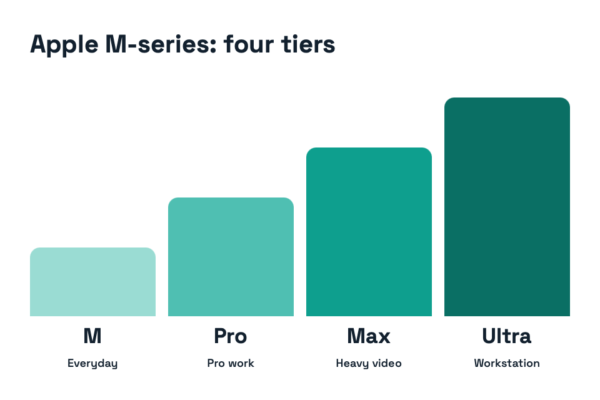
Apple’s M-series processors generally fall into four performance categories.
| Apple chip | Best suited to |
| M-series | Everyday computing, studying, business, general creativity |
| M-series Pro | Professional photography, video editing, programming, advanced multitasking |
| M-series Max | Demanding video production, animation, graphics-intensive workloads |
| M-series Ultra | High-end workstations, complex rendering, scientific computing, advanced AI |
For writers, bloggers, photographers, and professionals who frequently work away from a desk, an M-series MacBook Air can be appealing. These devices combine responsive computing with strong battery life, and the MacBook Air’s fanless design means there’s no cooling fan whirring away during your afternoon video meeting.
Apple Silicon also benefits from the company’s close integration of hardware and software. If you already use an iPhone, iPad, or other Apple products, features such as AirDrop, Handoff, and Universal Clipboard can make working across devices remarkably convenient.
There are, however, some considerations. Apple Silicon Macs generally don’t allow you to upgrade their memory or internal storage after purchase. You’ll also need to ensure that any specialist Windows applications you rely on have suitable macOS alternatives. Gaming compatibility remains another consideration when comparing Macs with conventional Windows gaming computers.
THE VERDICT: An excellent choice for productivity, creativity, portability, and users invested in the Apple ecosystem.
APPLE A-SERIES: SMALL CHIPS WITH SURPRISINGLY BIG CAPABILITIES
Apple’s A-series processors were originally designed primarily for iPhones and iPads. These chips integrate CPU and GPU cores, image processing capabilities, and Apple’s Neural Engine, with an emphasis on delivering powerful performance within the physical and battery constraints of portable devices.
They’re responsible for much more than opening applications. They contribute to computational photography, video recording, mobile gaming, biometric processing, and compatible on-device AI features.
The distinction between Apple’s mobile and computer processors became less clear in 2026. The introduction of the MacBook Neo, powered by the A18 Pro chip, demonstrated that a processor originally developed for an iPhone could also power a conventional macOS laptop.
This makes Apple’s A-series relevant to discussions about personal computers, particularly affordable devices designed for everyday productivity.
The difference between A-series and M-series chips isn’t simply that one is better than the other. They’re optimised for different workloads, power requirements, and device configurations.
| Feature | Apple A-series | Apple M-series |
| Typical devices | iPhones, selected iPads, MacBook Neo | Macs and selected iPads |
| Primary focus | Mobile efficiency, everyday responsiveness | Productivity, professional computing |
| Graphics | Mobile gaming and general creativity | Broader professional graphics capabilities |
| Memory capacity | Generally lower | Generally higher |
| Best applications | Communications, entertainment, photography, light productivity | Multitasking, professional creativity, demanding computing |
An A-series processor in an iPhone can produce outstanding video footage, but that doesn’t necessarily mean an A-series laptop is the best device for editing hours of high-resolution footage. The operating system, available memory, cooling, and software capabilities matter just as much as the processor.
THE VERDICT: Powerful, efficient chips that are ideal for mobile devices and increasingly relevant to affordable personal computing.
QUALCOMM SNAPDRAGON: COMPUTING THAT GOES WHEREVER YOU DO
BEST FOR: Frequent travellers, mobile professionals, remote workers, and battery-conscious users.
If you’ve owned an Android smartphone, chances are you’ve already encountered Qualcomm’s Snapdragon processors. Snapdragon has expanded considerably beyond smartphones, with its Arm-based Snapdragon X processor families powering Windows laptops designed around performance, portability, and energy efficiency.
In many respects, Snapdragon-powered Windows laptops represent an alternative to Apple’s M-series MacBooks for people who prefer the Windows operating system. Their appeal includes potentially longer battery life, responsive everyday computing, quieter operation, and dedicated AI acceleration.
For South Africans who work remotely, travel frequently, or need to remain productive during unexpected power interruptions, a laptop that doesn’t constantly demand a charging cable can be particularly attractive.
There is one important consideration: software compatibility. While Windows on Arm can run many conventional Windows applications through emulation, certain specialist programs, peripheral drivers, and games may not work as expected. Check compatibility with your essential software and accessories before committing to a Snapdragon-powered computer.
THE VERDICT: A compelling choice for mobile productivity, particularly if your work revolves around mainstream productivity applications and web-based tools.
NVIDIA: FROM GRAPHICS POWERHOUSE TO AI-FOCUSED COMPUTING
BEST FOR: Gaming, video editing, animation, 3D rendering, and advanced artificial intelligence applications.
Unlike conventional Intel Core and AMD Ryzen processors, Nvidia is traditionally best known among consumers for its graphics processing units. Its GeForce RTX graphics processors are particularly popular among gamers and creative professionals.
Nvidia GPUs can accelerate demanding applications such as:
- High-resolution gaming and ray tracing.
- Professional video editing and rendering.
- Three-dimensional modelling and animation.
- Livestreaming and GPU-accelerated content creation.
- Running compatible artificial intelligence applications locally.
Nvidia’s CUDA ecosystem also makes its graphics processors particularly relevant to developers, researchers, and professionals using compatible specialist software. However, Nvidia is no longer exclusively a graphics-focused consideration for personal computer buyers.
Introduced in 2026, Nvidia RTX Spark combines an Arm-based Grace CPU with an Nvidia RTX GPU, bringing integrated high-performance graphics and AI computing to a new generation of Windows computers.
It’s an interesting development for creative professionals and AI enthusiasts, although local availability, pricing, and application compatibility should inform purchasing decisions.
For ordinary users, however, a powerful graphics processor won’t automatically make emails load faster or improve their Microsoft Word experience. Dedicated graphics can also increase a computer’s purchase price, weight, heat output, and power consumption.
THE VERDICT: An outstanding choice for graphics-intensive computing, gaming, and compatible AI applications, but often an unnecessary expense for everyday productivity.
MEDIATEK: MORE THAN AN AFFORDABLE SMARTPHONE PROCESSOR
BEST FOR: Smartphones, tablets, Chromebooks, education, and portable entertainment.
MediaTek is another major player in mobile computing. Although historically associated with affordable smartphones, its processor portfolio extends well into premium devices.
| Processor family | Primary application |
| MediaTek Helio | Affordable 4G smartphones |
| MediaTek Dimensity | Entry-level to flagship 5G smartphones |
| MediaTek Kompanio | Chromebooks and cloud-focused computing |
MediaTek’s higher-end Dimensity processors support demanding mobile gaming, sophisticated photography, artificial intelligence functionality, and advanced connectivity.
Its Kompanio range, meanwhile, caters to Chromebook users who rely heavily on browser-based applications.
For South African students using Google Classroom, Google Docs, educational applications, and online research tools, a MediaTek-powered Chromebook could represent excellent value. However, a Chromebook isn’t necessarily a direct replacement for a Windows or macOS computer, especially if specific desktop applications are required.
THE VERDICT: A competitive option for mobile devices and cloud-based computing. Don’t dismiss MediaTek simply because a device is more affordable.
COMPUTER PROCESSORS COMPARED
Each processor family has particular strengths, but comparing them requires more than looking at processing speeds.
| Processor family | Strength | Primary consideration |
| Intel Celeron/N-series | Affordability | Limited performance on entry-level models |
| Intel Core/Core Ultra | Versatility and compatibility | Performance and efficiency vary by model |
| AMD Ryzen | Balanced performance and value | Specifications differ substantially between generations |
| AMD Threadripper | Intensive multi-core workloads | Expensive and unnecessary for everyday users |
| Apple M-series | Performance and energy efficiency | Limited hardware upgradeability |
| Apple A-series | Efficient mobile and everyday computing | Less suited to sustained professional workloads |
| Qualcomm Snapdragon | Portable productivity | Windows on Arm compatibility |
| Nvidia GeForce RTX | Graphics and AI acceleration | Additional cost and power consumption |
| Nvidia RTX Spark | Integrated graphics and AI computing | Compatibility, price, and local availability |
| MediaTek | Mobile efficiency and affordability | Device and operating system limitations |
X86 VS ARM: WHY PROCESSOR ARCHITECTURE MATTERS
One of the most interesting developments in modern computing is the growing competition between x86 and Arm-based processors.
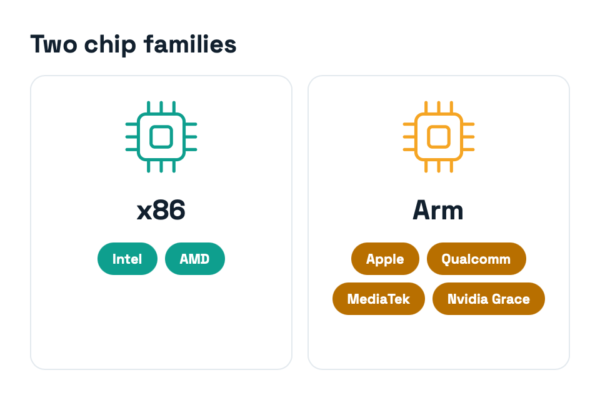
Intel and AMD traditionally use the x86-64 architecture in their mainstream personal computer processors. Apple Silicon, Qualcomm Snapdragon, and most MediaTek processors use Arm-based architectures. Nvidia’s Grace CPU is also Arm-based.
| Feature | x86-64 | Arm |
| Common processor brands | Intel and AMD | Apple, Qualcomm, MediaTek, and Nvidia Grace |
| Traditional strength | Established desktop software compatibility | Mobile and energy-efficient computing |
| Common operating systems | Windows and Linux | macOS, Windows on Arm, Android, iOS, ChromeOS, and Linux |
| Gaming compatibility | Extensive on Windows | Improving, but platform-dependent |
| Energy efficiency | Model-dependent | Often a major design priority |
Arm processors are no longer limited to smartphones and tablets. Apple’s success with the M-series and Qualcomm’s expansion into Windows computers demonstrate how capable this architecture can be.
However, Arm isn’t automatically more efficient, nor is x86 automatically more powerful. The chip’s design, manufacturing technology, software optimisation, and device configuration all contribute to its performance.
For consumers, the biggest practical difference often comes down to whether their preferred software works properly on their chosen platform.
WHICH COMPUTER PROCESSOR IS BEST FOR YOUR NEEDS?
Rather than shopping according to brand loyalty, consider what you’ll actually be doing with your device.
| User or application | Recommended processor |
| Basic home computing | Intel Core 3, Ryzen 3, or Apple A-series laptop |
| Primary and high school students | Intel N-series, Intel Core 3, or MediaTek Kompanio |
| University students | Intel Core 5, Ryzen 5, Apple A-series, or M-series |
| Office and business professionals | Intel Core 5, Ryzen 5, or Apple M-series |
| Writers and bloggers | Intel Core 5, Ryzen 5, Snapdragon X, or Apple Silicon |
| Frequent travellers | Apple M-series, Snapdragon X, or energy-efficient Intel and AMD models |
| Photographers | Apple M-series, Intel Core 5/7, or Ryzen 5/7 |
| Graphic designers | Apple M-series Pro, Ryzen 7, or Intel Core Ultra 7 |
| Video editors | Apple M-series Pro/Max or Intel/AMD with suitable dedicated graphics |
| Casual gamers | Ryzen or Intel Core with capable integrated graphics |
| Serious gamers | Ryzen X3D or Intel Core with Nvidia or AMD dedicated graphics |
| Architects and engineers | High-performance Intel, Ryzen, or Threadripper with suitable graphics |
| AI developers | Nvidia RTX, RTX Spark, or suitable Apple M-series systems |
| Android smartphone users | Snapdragon or MediaTek Dimensity |
| iPhone users | Apple A-series |
These recommendations are starting points rather than strict rules. A university student studying engineering will have vastly different computing requirements from someone studying journalism, for example.
DOES AN AI PROCESSOR REALLY MATTER?
Artificial intelligence has become one of the technology industry’s favourite selling points, with manufacturers increasingly promoting dedicated AI capabilities. Intel Core Ultra, AMD Ryzen AI, Qualcomm Snapdragon, Apple Silicon, and newer MediaTek processors incorporate specialised hardware for compatible AI workloads.
Nvidia also offers powerful GPU-based AI acceleration.
Dedicated AI hardware can support applications such as image enhancement, background removal, noise suppression, transcription, and compatible local AI assistants.
But do you actually need it?
If you’re primarily using ChatGPT, web-based AI services, or cloud-based productivity tools, much of the intensive AI processing happens remotely rather than on your computer. A powerful NPU isn’t necessarily going to transform your experience.
Local AI hardware becomes more relevant when running compatible AI models directly on your device, working with specialist creative applications, or using features designed to take advantage of that hardware.
Don’t pay a premium for AI capabilities simply because there’s an AI sticker on the laptop.
WHY A MORE EXPENSIVE PROCESSOR ISN’T NECESSARILY BETTER
Imagine buying a high-performance sports car exclusively for the daily school run. It’s impressive, but you’re paying for capabilities you’ll rarely use. Computer processors work much the same way.
A writer working in Word, managing a WordPress blog, editing photographs, and keeping several browser tabs open may benefit more from additional memory than from upgrading to a flagship processor.
Similarly, a gamer might achieve better results by investing in a more capable graphics card rather than purchasing the most expensive CPU available.
And someone who spends most of their working day moving between meetings, airports, and shared workspaces might value battery life far more than raw processing power.
When comparing computers, consider these practical specifications:
- RAM: 16GB is a sensible starting point for most new mainstream computers, while 32GB or more may benefit demanding users. An 8GB device can still be suitable for lighter workloads.
- Storage: A 512GB SSD offers a practical balance between capacity and responsiveness.
- Processor generation: A newer mid-range processor can outperform an older premium model.
- Graphics: Integrated graphics are sufficient for many everyday users.
- Battery life: Look for independent real-world battery tests rather than relying exclusively on advertised figures.
- Cooling: Poor thermal management can prevent powerful processors from delivering their full potential.
- Software compatibility: Ensure your essential applications and accessories work with your chosen device.
- Upgradeability: Check whether memory and storage can be upgraded later.
- Warranty and support: Consider South African technical support, repair options, and replacement component availability.
The processor might get top billing on the specifications sheet, but it’s only one part of the overall experience.
THE BOTTOM LINE: BUY FOR YOUR LIFESTYLE, NOT THE STICKER
There isn’t a universally superior computer processor.
Intel and AMD offer excellent mainstream computing options. Apple Silicon combines performance, efficiency, and ecosystem integration. Snapdragon delivers compelling mobile productivity capabilities. Nvidia excels at graphics-intensive computing, while MediaTek provides competitive mobile and cloud-based solutions.
If you’re unsure where to start, a recent Intel Core 5, AMD Ryzen 5, or standard Apple M-series computer with 16GB of memory and 512GB of SSD storage is a solid choice for most everyday users, provided it suits your software requirements and budget.
Ultimately, the best computer isn’t necessarily the fastest, newest, or most expensive one. It’s the one that quietly gets on with the job, keeps up with your lifestyle, and doesn’t leave your bank account begging for mercy.
How to pick a processor for a laptop, desktop or smartphone


Recharged is an independent site that focuses on technology, electric vehicles, and the digital life by Nafisa Akabor. Drawing from her 19-year tech journalism career, expect news, reviews, how-tos, comparisons, and practical uses of tech that are easy to digest. Nafisa is a traveller at heart, having been to 46 countries and counting. Find her edutainment videos covering tech, EVs and travel on TikTok.